
An office move is a complex project with many moving parts. In a perfect world, every aspect of this project would occur in a seamless sequence, but that requires a detail-oriented approach from the get-go.
Packing, transportation and furniture assembly are often easier to schedule than IT infrastructure, network connectivity, phone systems, access control and equipment setup. The most successful, stress-free office relocation technology plan should connect IT, facilities and vendors around the same schedule, so everyone can progress smoothly from lease signing to the first login in the new space.
Technology planning also gives facilities teams a dependable way to communicate with leadership and employees. When facilities and operations leaders document the schedule, equipment needs and support process early, everyone has more realistic expectations about what will happen before, during and after move weekend.
Why Technology Planning Matters in an Office Move
Waiting until the last minute to start planning an office relocation could create unintended obstacles for your project. Network connectivity, phone systems, data access, security systems and employee workstations must all be ready when the new office opens, and delays in any of these areas can affect your daily operations.
Procrastination can also increase costs and create unnecessary stress for facilities, operations and IT teams. Even a short disruption can affect employee productivity, client communication and confidence in the new space. Early coordination gives each team more time to solve issues before they affect the move.
Internet installation, cabling, equipment setup, vendor coordination and system testing often involve separate timelines, so assigning each workstream in advance will keep the move organized and reduce the chance of last-minute surprises.
Office Move Management Software and Relocation Management Tools
Software and relocation management tools allow facilities and operations leaders to turn a complex relocation into a visible, trackable project. Internally, the COO or other leaders should create a floor plan to maximize available space, then focus on coordinating the budget and deadlines with vendors.
This approach is also beneficial for identifying gaps, overlaps and missing information and resolving them before they create headaches on moving day.
Space Planning and Moves, Adds and Changes Software
Moves, adds and changes, commonly shortened to MAC, is the standard facilities workflow for handling seating assignments, layout changes and employee relocations within or across buildings. Purpose-built office moving software for this process typically includes digital floor plans, drag-and-drop seating assignments, space use analytics and stakeholder communication tools, with platforms like OfficeSpace and Eptura Workplace as two examples.
With some platforms, new hires can automatically populate the move queue through human resources information system integration, largely replacing spreadsheets, pen and paper as the go-to planning tool. Facilities managers and space managers rely on it most, since day-to-day seating logistics fall squarely within their domain. That same connection to HRIS mirrors how office asset management technology syncs with warehouse and enterprise resource planning systems on the physical side of a move.
Project Coordination and Vendor Management Tools
Designating a single point of contact for the entire relocation is an excellent strategy. This “owner” is responsible for delegating various responsibilities and keeping everyone moving in the same direction, eliminating the back-and-forth miscommunications that often plague disorganized projects.
Dedicated moving project management tools simplify this massive task by tracking milestone deadlines, vendor contracts, budgeting and communication logs in one place. While smaller organizations often use a master spreadsheet to fulfill these needs, relocation software offers better version control, stakeholder visibility and audit trails.
Asset Tracking and Inventory Technology
Asset tracking connects the planning phase to the physical move. Ensure every piece of equipment has a tag, catalog entry and assigned destination before you pack anything. Best practices include status reports at pickup and delivery, plus chain-of-custody documentation during transport and a final reconciliation once everything arrives.
For multilocation organizations, centralized office asset management and tracking prevents a costly and surprisingly common problem, where new equipment gets ordered while usable inventory sits unused at another site. Temporary commercial warehousing and storage support during phased moves gives that inventory somewhere to go until you need it.
The Technology Systems Every Commercial Office Move Must Cover
Once the project management tools are in place, facilities and operations teams can use them to coordinate the systems with a maximum impact on move-day continuity. None of this requires you to become an overnight IT expert, but knowing the landscape well enough to brief an IT team and catch gaps early can prevent confusion, delays and downtime.
Documentation is a must-have on relocation projects involving multiple vendors. A shared list of systems, owners, deadlines and testing steps gives each team a single source of truth and reduces the chances of duplicating or missing critical work.
Most commercial office moves involve four categories of commercial relocation technology, and each has different lead times, vendors and failure points.
1. Internet Connectivity and Network Infrastructure
Internet connectivity should be one of the first technology items you tackle in your office move. Soon after signing the lease, facilities and IT teams should confirm which providers serve the new building, what cabling is already in place and how much bandwidth the business will need.
A proactive review determines whether the office needs standard broadband, a dedicated leased line or redundant connectivity for business-critical operations. It’s also best to test switches, routers and Wi-Fi access points before employees arrive for their first day in the new office.
2. IT Infrastructure, Server Relocation and Data Security
Disconnecting and relocating servers is another project that might take longer than you anticipated, and it benefits from expert handling at every phase.
Label every component and complete a thorough data backup before unplugging anything. Then, document a chain of custody showing who is responsible for handling this precious cargo during the move, reconnecting the equipment and testing it before employees walk in on Day 1.
Servers require climate-controlled vehicles, specialized lifts and anti-static materials to survive the trip intact, which is why this workstream calls for IT disconnect and server relocation services rather than a general moving crew.
If you plan to retire equipment instead of moving it with you to your new location, remember that data wiping isn’t optional. It’s a compliance requirement you must adhere to.
3. Phone Systems and AV Equipment
Employees who rely on phones and audiovisual equipment for client communications, meetings and daily responsibilities will expect everything to be up and running when they get to the new office. Relocating also creates an excellent opportunity to decide whether you want to bring your older phones with you or replace them with a VoIP solution.
Before move-in, make a master list of the equipment teams need to disconnect, transport, reinstall or replace. Test videoconferencing hardware, room display screens, paging systems and background music systems in the new space before employees need to use them. Specialized office equipment moving and installation support keeps this equipment protected in transit.
4. Physical Security, Access Control and Surveillance
If badge access, security cameras and alarm systems are essential in your daily operations, do not wait until the last minute to address these needs. Coordinate all three with building management and your IT team well before moving day, since nonfunctional badge access creates genuine operational and compliance risks.
Regulated industries may have an even higher bar to clear, since they are subject to more stringent regulations around controlled access and documented chain of custody. That same discipline should extend to the secure decommissioning of equipment retired during the process, with data destruction records and compliance documentation.
Commercial Office Relocation Technology Timeline
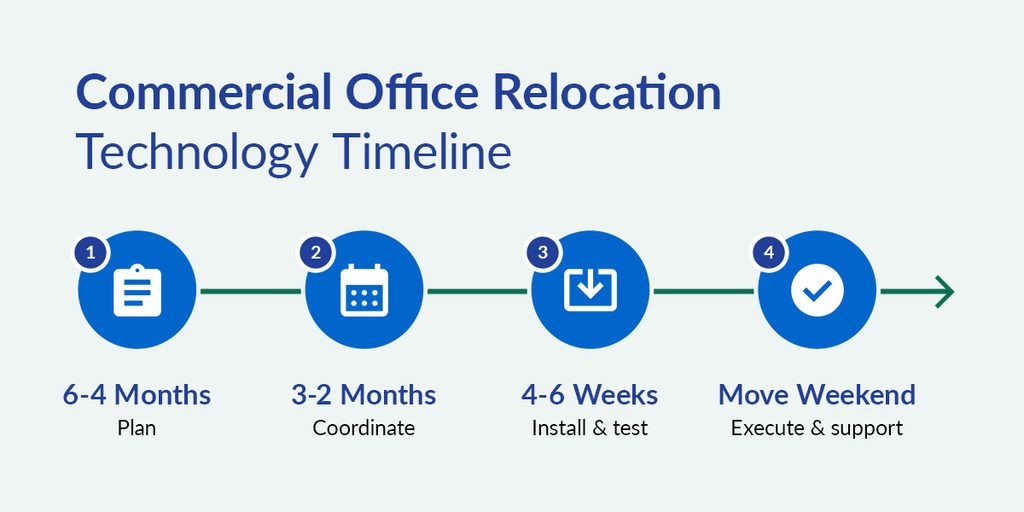
After identifying the tools and systems involved, it’s time to assign each workstream to the appropriate planning window. Each phase should identify who is responsible and what decisions they must finalize before moving into the next stage.
6 to 4 Months Before the Move
Start assembling the relocation team during this initial planning period. Designating an IT lead, a facilities lead and a single point of contact for vendors will prevent decisions from stalling later.
Once this team is in place, they should assess the new building’s cabling, network closets and power capacity and place the ISP order. Then, they must create a full technology asset inventory, including serial numbers, asset tags, warranty status and current location for every device. This record will become the foundation for office asset management and tracking throughout the move.
3 to 2 Months Before the Move
The focus in this phase shifts to ordering services, confirming vendors and coordinating installation timelines. Phone system migration planning and AV vendor coordination should also move forward now, alongside choosing and configuring move management software, since waiting until after the move is counterproductive.
The RFP process for commercial office moving services and other physical-move vendors should also begin within this window. Choosing vendors now gives each team enough time to confirm scope, schedule work and resolve questions before move day.
4 to 6 Weeks Before the Move
By this point, network installation, AV setup, security system activation and workstation configuration should be in place at your new location. Don’t forget to build in time for testing equipment and verifying that everything works seamlessly before normal business resumes.
Wherever possible, pre-staging equipment at the new location turns relocation weekend into a cutover instead of a setup, which compresses go-live risk significantly.
Move Weekend and First-Day Support
Keeping your business running during an office move means anticipating all the obstacles that could arise. Scheduling around after-hours and weekend moving services keeps disruption contained to the window built for it. Most office moves work best as live business events with dedicated coordination, not an improvised scramble. IT staff should be on-site from the moment unloading begins, identifying potential issues before they escalate and maintaining chain-of-custody documentation as they go along.
A Friday evening shutdown followed by Saturday setup leaves Sunday as a buffer day to complete final testing. On-site IT support during setup reduces the risk of extended downtime.
Following a detailed Day 1 plan, complete with a help desk contact and a defined escalation path, ties up loose ends by the time employees arrive and provides vital peace of mind during a hectic time.
Commercial Office Relocation Technology Checklist
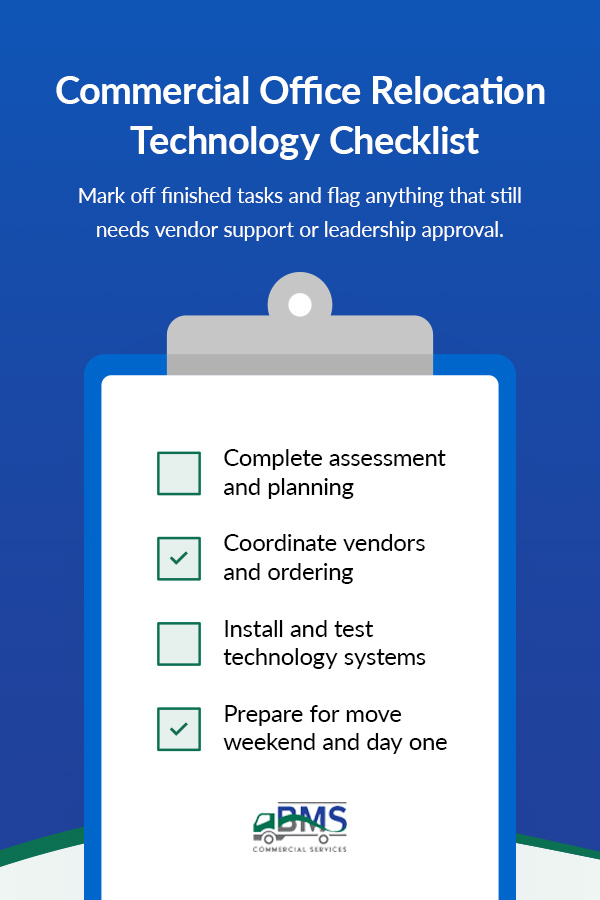
The project coordination team you appointed in the very earliest planning phases can stay on track with a checklist that they review and agree upon together. Mark off finished tasks and flag anything that still needs vendor support or leadership approval.
- Complete assessment and planning: Confirm the asset inventory, building requirements, ISP order, relocation team and budget before detailed move coordination begins.
- Coordinate vendors and ordering: Ensure your chosen third-party vendors understand their responsibilities, order required services, configure move management software and document work that needs a separate contract.
- Install and test technology systems: Verify network hardware, security systems, workstations, AV equipment and critical software before resuming business as usual.
- Prepare for move weekend and day one: Keep IT staff on-site, maintain chain-of-custody documentation and complete a final system check.
Plan Your Move With BMS Commercial Services™
Following a detailed plan with an established chain of custody is one way to ensure your physical move happens without a hitch. Partnering with BMS Commercial Services™ is another. We’ll coordinate that side of the process, working as a single point of contact across planning, equipment handling, IT disconnects, asset tracking, warehousing and move-day logistics for a smooth move and genuine peace of mind. Our professional team handles IT disconnect and server relocation, office equipment moving and installation and asset management and tracking, so hardware and furniture arrive at the new space accounted for and ready to use.
Retired equipment gets the same level of care, with office decommissioning and asset removal services handling data destruction and disposal in a way that satisfies compliance requirements. Phased moves get temporary support through secure warehousing and storage, giving IT and facilities teams room to stage equipment before cutover.
With decades of full-service commercial moving experience, BMS Commercial Services™ brings timely, effective and consistent quality to every relocation, including after-hours and weekend scheduling built around the cutover window this guide recommends. Call us at 833-876-0075 or reach out online to request your free quote.